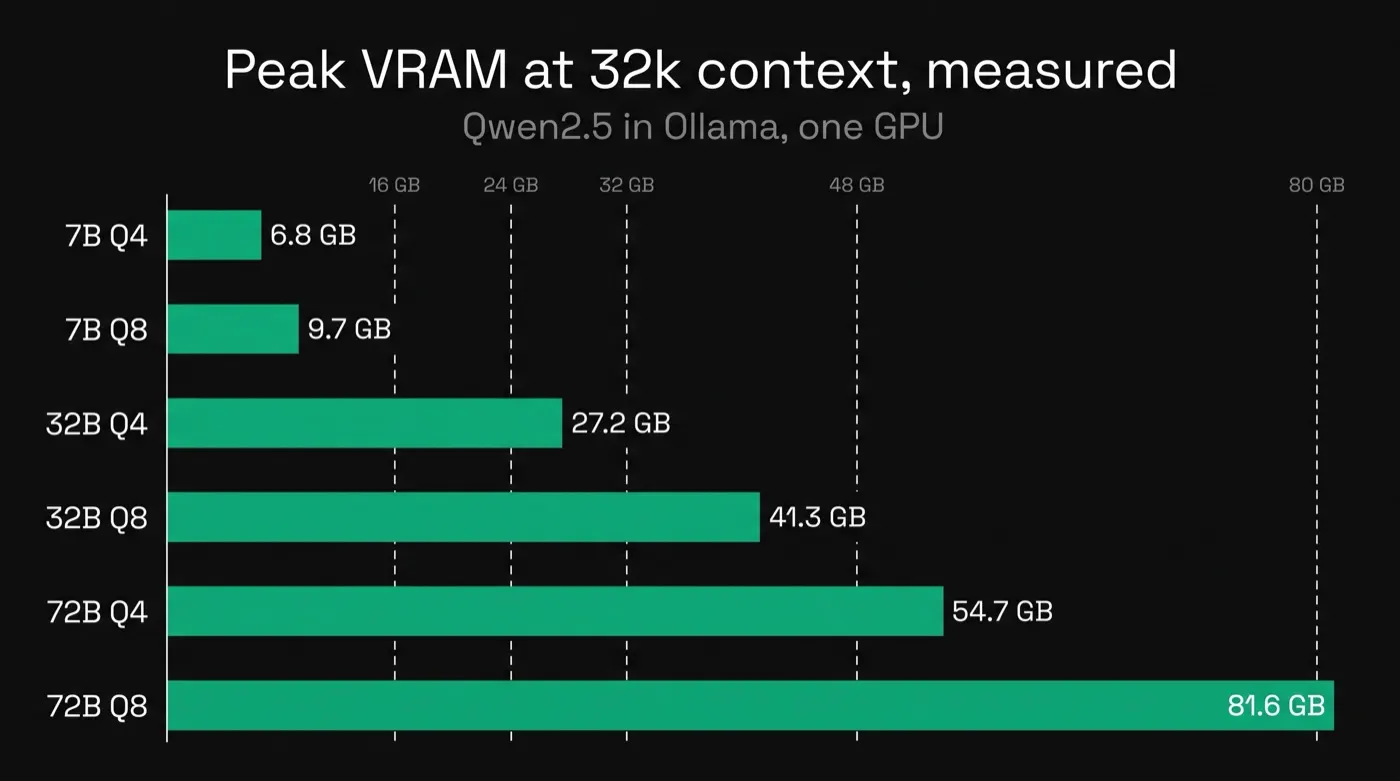
A 7B model at Q4 needs about 5 GB of VRAM at a 4,000-token context and 6.8 GB at 32,000, measured in Ollama.
A 32B at Q4 needs 20 to 27 GB and a 72B at Q4 needs 46 to 55 GB.
Context length adds memory on top of the weights: 1.8 GB for a 7B and 9 GB for a 72B going from 4k to 32k.
LeanLM (not affiliated with Google's LearnLM educational AI) measures what AI workloads cost to serve. Every number below comes from our own runs on a stated GPU.
How much VRAM does a local LLM need?
Between 5 GB and 82 GB in our tests: a 7B needs 5 to 10 GB, a 32B 20 to 41 GB and a 72B 46 to 82 GB, depending on the quant and the context length. We ran Qwen2.5 Instruct at 7B, 32B and 72B, each at Q4_K_M and Q8_0 (4-bit and 8-bit quantized weights), at a 4,096 and a 32,768-token context, in Ollama on one NVIDIA RTX PRO 6000 (96 GB):
| Model | Peak VRAM 4k / 32k | Decode tok/s (4k) | J per short task (4k) | Long-prompt TTFT (32k) |
|---|---|---|---|---|
| 7B Q4_K_M | 5.1 GB / 6.8 GB | 106 | 887 J | 2.5 s |
| 7B Q8_0 | 8.5 GB / 9.7 GB | 75 | 1,180 J | 2.5 s |
| 32B Q4_K_M | 19.9 GB / 27.2 GB | 39 | 2,690 J | 8.3 s |
| 32B Q8_0 | 33.5 GB / 41.3 GB | 20 | 4,720 J | 8.1 s |
| 72B Q4_K_M | 46.2 GB / 54.7 GB | 20 | 5,894 J | 15.3 s |
| 72B Q8_0 | 73.4 GB / 81.6 GB | 16 | 6,514 J | 15.5 s |
Peak VRAM is nvidia-smi memory.used, the maximum over the cell, and includes the CUDA context; all GB on this page are binary (GiB, as nvidia-smi reports). Decode tok/s and J per short task (idle-subtracted GPU energy) are means over 20 HumanEval prompts at temperature 0. Time to first token (TTFT) is from one long prompt filling about 70% of the 32k context. One NVIDIA RTX PRO 6000 Blackwell Server Edition (96 GB), Ollama with OLLAMA_FLASH_ATTENTION=1, every cell 100% on the GPU. Full data: how-much-vram-local-llm-measured.csv. Speed and energy are from the 4k runs; the 32k runs were within a few percent (see the CSV).
Which models fit 8GB, 16GB, 24GB and 32GB cards?
A 16 GB card runs any 7B we tested, a 24 GB card runs a 32B at Q4 only with a short context, and a 72B needs 48 GB or more. The fits below are derived from the measured peaks above plus 1 GB of headroom for the OS and other processes; they weren't run on those specific cards.
| Card | Fits | Doesn't fit |
|---|---|---|
| 8 GB | 7B Q4 at both contexts (6.8 GB at 32k is tight) | 7B Q8; everything larger |
| 12 GB | 7B at Q4 or Q8, both contexts | 32B and 72B, any quant |
| 16 GB | 7B at Q4 or Q8, both contexts | 32B and 72B, any quant |
| 24 GB | 32B Q4 at 4k (19.9 GB) | 32B Q4 at 32k (27.2 GB); 32B Q8; 72B |
| 32 GB | 32B Q4 at 32k | 32B Q8; 72B |
| 48 GB | 32B Q8, both contexts; 72B Q4 at 4k only (46.2 GB) | 72B Q4 at 32k; 72B Q8 |
| 80 GB | 72B Q4 at 32k; 72B Q8 at 4k (73.4 GB) | 72B Q8 at 32k (81.6 GB) |
| 96 GB | 72B Q8 at 32k (81.6 GB) | Every cell in this test fits |
Derived from the measured peaks above plus 1 GB of headroom, not measured directly on these card sizes. Use the two tables as a VRAM calculator: find the model size and quant, then read the peak at your context length. Weights-only calculators leave out the growth of the KV cache (the attention keys and values the model stores for every token in the context) shown in the next section.
The rig runs in your VPC, or your engineers run it and we interpret the output.
How much memory does context length add?
Context length adds memory through the KV cache, and how much depends on the model's layers and attention heads. The quant doesn't change it. Going from 4k to 32k tokens after load added 1.8 GB for the 7B (Q4) and 1.7 GB (Q8), 7.2 GB for the 32B (both quants), and 9.0 GB for the 72B (Q4) and 8.8 GB (Q8). The KV cache grows with context length, and it's about the same size at a given context whether the weights are Q4 or Q8.
The measured growth matches the standard KV cache formula within 0.3 GB:
KV cache per token = 2 (K and V) x layers x KV heads x head dim x 2 bytes (f16)For Qwen2.5: the 7B (28 layers, 4 KV heads, head dim 128) works out to 56 KiB per token, about 1.5 GB for the 28,672 extra tokens between 4k and 32k. The 32B (64 layers, 8 KV heads) works out to 256 KiB per token, about 7.0 GB. The 72B (80 layers, 8 KV heads) works out to 320 KiB per token, about 8.8 GB. Those are derived from the formula; the measured growth (1.8, 7.2 and 9.0 GB) landed within 0.3 GB of each.
Q4 or Q8: which quant should you run?
Q8 needs more memory than Q4, runs slower and uses more energy per task, in every pair we measured. The 7B ran at 75 tok/s at Q8 against 106 tok/s at Q4 and used 1,180 J against 887 J per short task. The 32B ran at 20 tok/s against 39 tok/s and used 4,720 J against 2,690 J. The 72B ran at 16 tok/s against 20 tok/s and used 6,514 J against 5,894 J. We didn't measure any accuracy difference between the two quants in this test, so this comparison is speed, memory and energy only.
Best local LLM for coding on 16GB or 24GB VRAM
Neither Qwen 3.8 27B nor Qwen3-Coder 30B fits comfortably on a 24 GB card at the context we ran, and both need a 32 GB card. In an earlier test on a different card and runtime (an AMD Radeon AI PRO R9700 with 32 GB, running Ollama on Vulkan), Qwen 3.8 27B at Q4_K_M peaked at 23.8 GB and passed 92.7% of HumanEval+ in one attempt, and Qwen3-Coder 30B at Q4_K_M peaked at 25.8 GB and passed 88.4%. See the full coding benchmark on the R9700 for the setup and every score. For a local LLM for coding on 16 GB VRAM, the fits list above points at the 7B class instead: a 7B model at Q4 or Q8 fits 16 GB at either context we tested. The 7B coding model we've tested is Qwen2.5-Coder-7B-Instruct: with a retry loop it passed 144 of 164 HumanEval+ tasks (87.8%) in our retry-ladder test. Its memory wasn't measured in this run; it's the same size as the 7B above. Once a model fits, see what self-hosting costs once it fits before committing hardware.
What hasn't been measured yet?
This test covers Ollama on one 96 GB workstation card at two context lengths. It doesn't cover a 131,072-token context: we asked Ollama for it and it capped num_ctx (Ollama's context-length setting) at Qwen2.5's default of 32,768, so memory stayed at the 32k figure and the long prompt was truncated to 16,386 tokens. By the KV cache formula, a 7B at 128k would add about 5.3 GB more KV cache over 32k; that's derived, not measured. It also doesn't cover decode speed on consumer cards (the speeds above are from a 96 GB workstation card; consumer cards with less memory bandwidth will be slower, though the memory numbers carry over), 8 GB cards run end to end, other runtimes (llama.cpp directly, vLLM), accuracy differences by quant, or multi-GPU splits.
Frequently Asked Questions
How much VRAM do I need to run a 7B model?
About 5 GB at Q4 with a 4,000-token context and 6.8 GB at 32,000 tokens, measured in Ollama. At Q8 it's 8.5 to 9.7 GB.
Can I run a 32B model on 24GB VRAM?
At Q4 with a short context, yes: it peaked at 19.9 GB at 4,000 tokens. At 32,000 tokens it needed 27.2 GB, which is more than a 24 GB card has.
How much VRAM does a 70B model need?
The closest size we tested is Qwen2.5 72B. A 72B at Q4 needed 46.2 GB at a 4,000-token context and 54.7 GB at 32,000. At Q8 it needed 73.4 to 81.6 GB.
Is 16GB VRAM enough for a local LLM?
For a 7B model, yes, at Q4 or Q8 and up to a 32,000-token context. A 32B model needs about 20 GB even at Q4 with a short context.
How much does context length add to VRAM?
It depends on the model's layers and KV heads. The quant barely changes it. Going from 4,000 to 32,000 tokens added 1.8 GB for Qwen2.5 7B, 7.2 GB for 32B and 9 GB for 72B.
Is Q8 worth it over Q4?
It costs more memory, speed and energy: a 32B at Q8 ran at 20 tokens per second against 39 at Q4 and used 75% more energy per task. We haven't measured the accuracy difference.
Methods
- Hardware. RunPod, one NVIDIA RTX PRO 6000 Blackwell Server Edition (96 GB), 2026-09-28.
- Software. Ollama with
OLLAMA_FLASH_ATTENTION=1, KV cache f16 (default). - Models. Qwen2.5 Instruct 7B, 32B and 72B from the Ollama library, each at q4_K_M and q8_0.
- Context. num_ctx 4,096 and 32,768.
- Per-cell procedure. 20 HumanEval prompts (temperature 0, up to 512 output tokens) for decode speed and energy, plus one long prompt filling about 70% of the context (2,836 tokens at 4k, 23,102 at 32k) for time to first token.
- Memory method. nvidia-smi memory.used, peak over the cell, includes the CUDA context. Every cell ran 100% on the GPU.
- Energy method. GPU board power at 5 Hz, idle power (84 to 92 W on this card) subtracted, mean per short task.
- 128k cap. Requesting num_ctx 131,072 was capped by Ollama at Qwen2.5's default of 32,768; memory stayed at the 32k figure and the long prompt was truncated to 16,386 tokens, so 128k wasn't measured.
- Data. Every measured row on this page: how-much-vram-local-llm-measured.csv.
- Date. Measured 2026-09-28.