Every other comparison of LLM cost tracking tools is written by someone who sells one. We don't — LeanLM is an optimization layer that works on top of whichever tracking tool you already have. So this is the comparison you actually want: the trade-offs, the pricing gotchas, and the honest answer to "which one should I use."
The short version: cost management for LLMs happens across four layers, and most teams at scale need at least one tool from Layer 1 and one from Layer 2. The layer you're missing is usually the one where your cost surprises are hiding.
LeanLM (not affiliated with Google's LearnLM educational AI) is an LLM cost optimization platform. This post covers the tools that track and manage costs — a separate problem from the optimizations themselves (routing, caching, compression) that actually reduce spend.
Updated July 2026
Two of the seven tools originally covered here have since been acquired: Helicone by Mintlify (March 2026) and Portkey by Palo Alto Networks (May 2026) — both are noted below with what changed. This update also adds a benchmark/pricing-reference layer (ArtificialAnalysis), a dedicated FinOps section (CloudZero and smaller entrants), and OpenRouter, which has become the best-funded tool in this category since this post's original publish date.
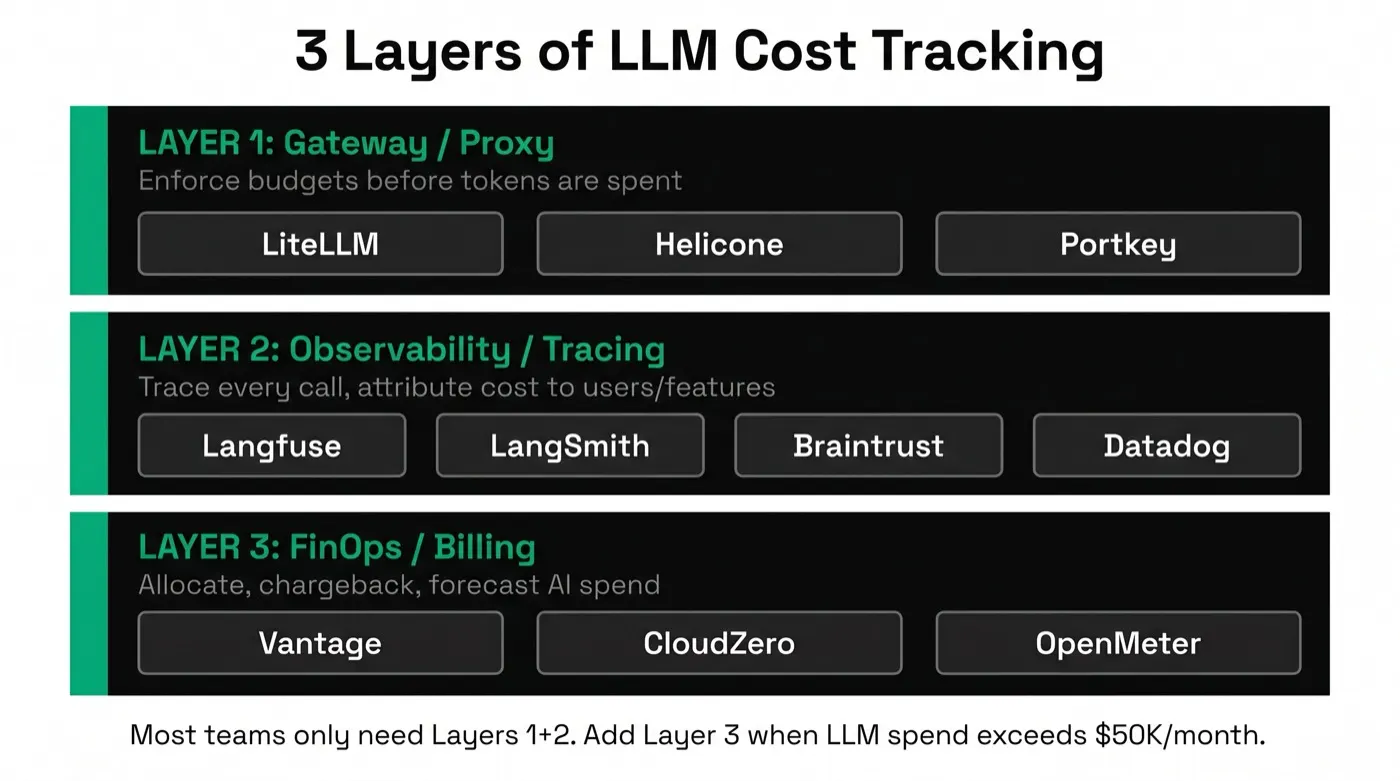
The 4-Layer Model
Layer 0: Benchmark / Pricing Reference — compare models on cost, latency, and quality before you build. Tools: ArtificialAnalysis.
Layer 1: Gateway / Proxy — enforce budget limits before tokens are spent. Tools: LiteLLM, Helicone, Portkey, OpenRouter.
Layer 2: Observability / Tracing — trace every call, attribute cost to users and features after the fact. Tools: Langfuse, LangSmith, Braintrust, Datadog.
Layer 3: FinOps / Billing — cross-cloud cost allocation and chargeback reporting. Tools: CloudZero, and smaller AI-specific entrants (Costbase, LLM CFO, Optimetric, NavyaAI). Needed when LLM spend exceeds ~$50K/month and finance teams get involved.
TL;DR Comparison Table
| Tool | Layer | Open Source | Free Tier | Paid Starts At | Best For |
|---|---|---|---|---|---|
| ArtificialAnalysis | Benchmark | No | Yes (site is free) | API: custom (Pro tier) | Comparing models before you build |
| Langfuse | Observability | Yes (self-host) | 50K obs/mo | $59/mo | Self-hostable tracing + attribution |
| Datadog | Observability | No | No | ~$31/host/mo + usage | Existing Datadog users |
| Helicone (acq. Mintlify) | Gateway | Yes (self-host) | 10K req/mo | $79/mo | Analytics-first gateway |
| LangSmith | Observability | No | Yes (limited) | $39/user/mo | LangChain/LangGraph users |
| Braintrust | Observability + Evals | No | Yes (limited) | Usage-based | Continuous evals + cost |
| LiteLLM | Gateway | Yes (self-host) | Unlimited (self-host) | $0 (Enterprise: ~$250/mo) | Multi-model routing + budgets |
| OpenRouter | Gateway | No | Pass-through pricing | 5.5% top-up fee | Widest model marketplace |
| CloudZero | FinOps | No | No | ~1% of managed spend | Enterprise finance-led attribution |
| Portkey (acq. Palo Alto) | Gateway | Yes (self-host) | 10K req/mo | $49/mo | Reliability controls + cost |
Pricing verified July 2026. Self-hosted versions of open-source tools are free but require your own infrastructure. LangSmith Plus is $39/user/month + $0.0036/minute standby on Cloud. OpenRouter and CloudZero don't publish flat "starts at" pricing — OpenRouter passes through provider rates with a fee only on card top-ups and high-volume BYOK traffic; CloudZero prices as a percentage of managed cloud spend, negotiated per contract. Portkey's figures are pre-acquisition and unconfirmed post-close — verify directly before budgeting. LiteLLM's enterprise pricing isn't published as a clean table; treat $250/mo as an approximate starting point, not a quote.
Layer 0: Benchmark / Pricing Reference
Before you build anything, the first cost decision is which model to use. Benchmark sites answer that question with data instead of vendor marketing — they don't sit in your request path and don't track your production spend, but skipping this layer means picking a model on reputation instead of on measured cost-per-task.
ArtificialAnalysis.ai
ArtificialAnalysis is an independent benchmark site tracking 300+ models across 20+ providers — OpenAI, Anthropic, Google, Meta, Mistral, DeepSeek, and more. It's become the de facto pricing reference in the LLM space: its Intelligence Index vs. output-speed charts and cost-per-task figures get cited in vendor launch materials and enterprise benchmark leaderboards alike.
Unlike the gateway and observability tools below, ArtificialAnalysis doesn't touch your production traffic. It answers a different question — "which model should I use" rather than "what did I spend" — and its coverage of effective pricing (cached, batch, and long-context tiers) makes it a genuinely useful cross-check against provider list prices before you commit to an architecture.
Cost-relevant highlights: Cost per million input/output tokens, cost-per-task and tokens-per-task scoring, cached-input and cache-write pricing, updated roughly 8×/day. Free to browse; a paid API (Self-serve/Pro/Commercial tiers) exists for teams that want to pull the data programmatically or redistribute it.
Pricing: The site is free. API access has a free self-serve key for internal use, a paid Pro tier for full data and higher limits, and a custom Commercial tier for redistribution.
Who should use it: Anyone choosing between models before writing code, or periodically re-checking whether a cheaper model now meets the same quality bar. Pair with the effective-cost math in our LLM effective cost table once you know which providers you're comparing.
Watch out for: It's a reference site, not a tracking tool — it tells you nothing about your own production spend. Pricing across providers uses different tokenizers, so a raw $/MTok comparison can understate a model that tokenizes your specific content less efficiently.
Layer 1: Gateway / Proxy Tools
Gateway tools sit between your application code and the LLM API. Every request passes through them. This gives them the power to do things no observability tool can: enforce budget limits before a request fires, route to fallback models when a provider is down, and cache repeated prompts to avoid billing entirely. The cost data they produce is exact — they see the raw token counts before any provider-side summarization.
LiteLLM
LiteLLM is the most widely deployed open-source LLM gateway. It normalizes 100+ models — OpenAI, Anthropic, Gemini, Mistral, Bedrock, Azure, and more — to a single OpenAI-compatible API, meaning you change one line of code and gain routing flexibility across the entire LLM landscape.
For cost tracking specifically, LiteLLM offers: per-model cost calculation using a built-in pricing table (updated regularly), per-user and per-team budget enforcement with hard limits and soft alerts, detailed spend analytics at the model and user level, and SQLite/PostgreSQL storage for historical cost data.
Cost tracking highlights: Set max_budget per user key. Track spend via the /spend/users and /spend/models endpoints. Integrates with Prometheus for infra-level cost dashboards. Logs to Langfuse, Helicone, or Datadog if you want trace-level detail alongside the proxy metrics.
Pricing: Open-source and free to self-host (MIT-licensed Proxy Server). Enterprise tier (self-hosted, license only) starts around $250/month for the basic tier, with reported higher tiers for SLAs, SSO, and audit logs — LiteLLM doesn't publish a clean enterprise pricing table, so confirm current numbers directly with the vendor.
Who should use it: Multi-model teams who need routing + fallbacks + budget enforcement as a unified layer. Excellent choice as the gateway leg of a gateway + observability stack.
Watch out for: Self-hosting adds ops burden. The analytics UI is functional but less polished than dedicated observability tools. LiteLLM disclosed 6 CVEs between March and June 2026 — including a supply-chain compromise and a privilege-escalation chain letting a low-privilege user reach proxy_admin — all since patched; if you self-host an internet-exposed instance, stay current on releases and review the project's security advisories. For trace-level debugging, pair with Langfuse or Braintrust.
Helicone
Acquired by Mintlify in March 2026 and now in maintenance mode — Helicone's team joined Mintlify, and while security updates, new model support, and bug fixes continue, active new-feature development has slowed. The product remains live and usable at its existing pricing.
Helicone is an analytics-first LLM gateway. The integration is famously simple: add one line changing your base URL (or a single header for non-proxy setups), and every LLM call is logged automatically with cost, latency, token counts, and the full prompt/response.
Unlike LiteLLM, which is primarily a routing layer, Helicone leads with analytics. Its dashboard surfaces cost trends by model, time, user, and property (custom metadata you attach to requests). You can filter to any segment — "show me cost for user_id=123 on Claude-3-Opus over the last 30 days" — without any custom instrumentation beyond adding a metadata header.
Cost tracking highlights: Automatic cost calculation across all major providers. Custom properties for per-user, per-feature attribution. Rate limiting and budget alerts. Prompt management with A/B cost comparison. Open-source (Apache 2.0), self-hostable at every tier.
Pricing: Hobby (free): 10,000 requests/month, 7-day retention. Pro: $79/month, unlimited seats, 1-month retention. Team: $799/month, adds SOC 2 & HIPAA compliance, 3-month retention. Enterprise: custom, on-prem available.
Who should use it: Teams who want detailed LLM analytics with minimal integration work and are comfortable adopting a product in maintenance mode. Strong choice for product teams iterating fast — the prompt playground and cost comparison features make it easy to evaluate prompt changes before deploying.
Watch out for: Routing and fallback features are lighter than LiteLLM. Post-acquisition, expect stability over new features — evaluate whether that trade-off matters for your roadmap.
Portkey
Acquired by Palo Alto Networks, completed May 29, 2026 — Portkey's AI gateway is now integrated into Palo Alto's Prisma AIRS platform as a unified control plane for governing and securing autonomous AI agents. The core gateway product remains available; expect its roadmap to increasingly reflect Palo Alto's enterprise-security priorities rather than operating as an independent startup.
Portkey is a production AI gateway that combines cost tracking with reliability engineering: automatic fallbacks, load balancing across providers, semantic caching, and canary deployments for prompt changes. For teams where availability and cost are coupled concerns, Portkey addresses both in one layer.
Cost tracking in Portkey is built around "virtual keys" — per-user, per-app API key wrappers that carry budget limits, model access controls, and spend tracking. You create a virtual key for each user or team, set a maximum spend, and Portkey hard-blocks requests when the limit is hit. Cost attribution is automatic — every request is tagged to its virtual key.
Cost tracking highlights: Per-user virtual keys with hard budget limits. Cost breakdowns by model, virtual key, and time window. Semantic caching to avoid re-billing identical prompts (cache hit = $0 cost). Real-time spend dashboards. Audit logs for every request.
Pricing: Developer (free): 10,000 logs/month. Production: $49/month for 100,000 logs. Enterprise: custom. Treat these as pre-acquisition figures — pricing and packaging are explicitly unsettled post-acquisition, so confirm current tiers with Portkey/Palo Alto directly before budgeting.
Who should use it: Production teams who need reliability (fallbacks, load balancing) alongside cost tracking. Particularly useful for multi-tenant applications where each customer needs an isolated budget — and teams already standardizing on Palo Alto's security stack may find the Prisma AIRS integration a plus rather than a concern.
Watch out for: Semantic caching requires careful prompt normalization to hit reliably. The feature set overlaps heavily with LiteLLM and OpenRouter — evaluate all three if you're choosing between gateway tools, and factor in that Portkey's product direction now answers to Palo Alto Networks' roadmap.
OpenRouter
OpenRouter is a unified API and model marketplace: one OpenAI-compatible key gets you access to 400+ models from 60+ providers, with automatic routing to the most efficient provider by latency, cost, or quality, plus provider-level failover when a specific host is down. It raised a $113M Series B led by CapitalG (Alphabet's growth fund) in May 2026, more than doubling its valuation to roughly $1.3B in a year — the best-funded tool in this comparison by a wide margin.
Unlike LiteLLM, Helicone, or Portkey, OpenRouter isn't primarily something you self-host or point at your own provider accounts — it's a marketplace you route traffic through, and it charges for that access rather than for observability seats.
Cost-relevant highlights: Cost/latency/quality-based auto-routing ("Auto Exacto"), opt-in model fallback priority lists, "zero-completion insurance" (failed requests aren't billed), response caching, and configurable cost/data-governance guardrails.
Pricing: Passes through provider token rates without markup on standard usage. Charges a 5.5% fee on credit-card top-ups (minimum $0.80), and a 5% fee on bring-your-own-key requests once you exceed 1M/month (5M/month on enterprise plans).
Who should use it: Teams that want the widest possible model selection — including lower-cost open-weight models (DeepSeek, Qwen, GLM) — without integrating each provider separately, and who are comfortable with a marketplace fee model instead of a flat subscription.
Watch out for: The top-up and BYOK fees are a real cost at scale — model them against a direct-provider or self-hosted-gateway approach before committing. It's a marketplace, not an observability tool; pair with Layer 2 for trace-level attribution.
Early Access
Know What You're Spending — and Cut It
LeanLM layers on top of your existing tracking stack to validate optimization changes against your production data. See which tool + optimization combination works on your actual traffic before committing.
Layer 2: Observability / Tracing Tools
Observability tools don't sit in the hot path — they receive trace data after the fact, often via an SDK or async export. This means they add zero latency to your LLM calls and can be added at any time without rearchitecting. The trade-off: they can't enforce real-time budget limits the way a gateway can. They tell you what happened and why; the gateway is what stops it from happening again.
Langfuse
Langfuse is the most widely adopted open-source LLM observability platform. It provides trace-level visibility into every LLM call: input tokens, output tokens, cost (calculated from its model pricing table), latency, user metadata, and the full prompt/completion chain. For multi-step agents and chains, it renders a visual timeline showing how cost and latency decompose across sub-steps.
Cost tracking is first-class in Langfuse. You can view cost by model, by user, by session, or by any custom tag you attach at trace time. The cost dashboard shows daily/weekly/monthly trends with model-level breakdowns. If a new prompt version costs 30% more, you'll see it in the cost trend before it shows up on your API invoice.
Cost tracking highlights: Automatic cost estimation for all major models (you can override with custom pricing). Cost aggregation by user, session, or any custom tag. Prompt management with cost comparison across versions. Evaluation metrics co-located with cost data. Python/TypeScript SDK + OpenAI drop-in wrapper + LangChain integration.
Pricing: Self-hosted: free (MIT license, runs on Docker). Cloud: free tier (50,000 observations/month), Hobby ($59/month), Pro ($119/month), Team ($299/month). Enterprise: custom with SSO and SLA.
Who should use it: The default choice for teams that want trace-level cost visibility without vendor lock-in. Self-hosting on your own infrastructure means no per-observation cost as you scale, and you own the data. Strong choice for any team that isn't already standardized on Datadog or LangSmith.
Watch out for: Self-hosting adds ops burden. The built-in evals are lighter than Braintrust. Langfuse doesn't enforce real-time budget limits — pair with LiteLLM or Portkey for that.
LangSmith
LangSmith is LangChain's observability and evaluation platform. If you're using LangChain or LangGraph, it's the lowest-friction observability option by far — set two environment variables and every chain, agent, and LLM call is automatically traced with cost and latency data. There's no code change required beyond the env vars.
The LangSmith trace UI is purpose-built for LangChain's abstractions: it renders chains, retrievals, tool calls, and agent steps in a nested timeline that mirrors how LangChain actually executes them. Cost is summed at each level of the hierarchy, making it easy to identify which part of a chain is expensive.
Cost tracking highlights: Automatic tracing with zero code changes for LangChain users. Cost aggregated at chain, step, and run level. Dataset-based regression testing with cost comparison across prompt versions. Filter and search runs by model, cost, latency, or custom metadata.
Pricing: Developer (free): limited trace storage. Plus: $39/user/month. Enterprise: custom. Hosted Cloud uses $0.0036/minute standby pricing for LangGraph Cloud deployments — this can accumulate if you forget to scale down.
Who should use it: Teams using LangChain or LangGraph who want zero-friction observability. If you're not on LangChain, Langfuse or Braintrust will give you more for less money.
Watch out for: LangSmith is optimized for the LangChain abstraction layer — it's less useful if you're making raw OpenAI/Anthropic calls or using another framework. Per-user pricing scales poorly for large engineering teams. The LangGraph Cloud standby pricing is easy to forget.
Braintrust
Braintrust is an AI engineering platform that combines evaluation, logging, and prompt management in one product. Its positioning is slightly different from pure-observability tools: it's built for teams running continuous evals as part of their development cycle, not just monitoring in production.
Cost tracking in Braintrust comes alongside evaluation scores — you can see, for any prompt version, both the quality metrics and the cost. This is the right framing for teams optimizing the cost/quality trade-off: you're not just asking "how much did this cost?" but "how much did this cost, and was it worth it?" The experiment tracking UI makes it easy to compare prompt versions on both dimensions simultaneously.
Cost tracking highlights: Cost visible at trace and experiment level. Automatic cost calculation for all major providers. Cost comparison across prompt versions in experiment view. LLM playground with cost preview before deployment. Prompt catalog for managing versions across teams.
Pricing: Braintrust uses usage-based pricing (per log/trace event). Free tier available. Contact for enterprise pricing. The model is friendly for getting started but can scale less predictably at very high log volumes.
Who should use it: Teams who care as much about quality as cost and want to track both in the same tool. Strong choice for ML engineers running structured evals. Less necessary if you're primarily doing production monitoring without a structured eval workflow.
Watch out for: The eval focus can feel like overhead for teams that just want cost tracking. At high log volumes, usage-based pricing requires active monitoring. Less LangChain-native than LangSmith.
Datadog LLM Observability
Datadog added LLM Observability (GA 2025) as part of its APM platform. For teams already on Datadog, this is the path of least resistance: LLM cost data flows into the same dashboards, alerts, and on-call runbooks as your existing infrastructure metrics. When an LLM cost spike happens at 2am, your on-call engineer already knows how to use the tool that's paging them.
The integration captures token counts, cost estimates, latency, error rates, and custom evaluation metrics for OpenAI, Anthropic, Cohere, and other providers. Auto-instrumentation covers the most common Python and JS clients — no SDK integration required for the basics.
Cost tracking highlights: Auto-instrumentation for OpenAI, Anthropic, Cohere, and LangChain. Cost and latency SLOs in the same Datadog interface as infra SLOs. Anomaly detection on spend using Datadog's existing ML alerting. Trace correlation — link an LLM cost spike to the specific backend service or deployment that caused it.
Pricing: Datadog is the most expensive option on this list. LLM Observability pricing is usage-based on top of existing Datadog contracts. Typical all-in cost for meaningful LLM monitoring is $500–$2,000+/month at scale. Suitable for enterprises already in the Datadog ecosystem where the incremental cost is low relative to existing spend.
Who should use it: Enterprises already standardized on Datadog where adding a new vendor is a harder sell than an incremental Datadog feature. The observability depth for LLM-specific concerns is shallower than dedicated tools, but the platform integration is unmatched.
Watch out for: Expensive to adopt fresh if you're not already a Datadog customer. LLM-specific features (prompt management, eval workflows) are less mature than Langfuse or Braintrust. Not a good choice for cost-sensitive startups.
Layer 3: FinOps / Billing
FinOps tools operate a level above the gateway and observability layers — they don't touch individual LLM calls, they ingest spend data (from gateways, providers, or direct API usage) and turn it into the attribution, forecasting, and chargeback reporting finance teams need. This layer matters once LLM spend is big enough that "which team, which feature, which customer" becomes a board-level question, not just an engineering one.
CloudZero
CloudZero is an established cloud cost intelligence platform ($119M raised across 7 rounds) that launched a dedicated AI financial control plane in May 2026. It ingests real-time AI spend directly from LLM gateways (including LiteLLM), desktop usage, and OpenTelemetry streams, then attributes it by model, provider, prompt pattern, customer, product, and feature — the "unit economics" view that a gateway's per-key budget alone doesn't give you.
This is a finance-facing tool, not a developer-facing one. It doesn't compete with the gateway layer — it consumes the data gateways produce and turns it into cost-per-customer and cost-per-feature numbers a CFO can use.
Cost-relevant highlights: Multi-dimensional AI spend allocation, direct integration with OpenAI, Anthropic, AWS Bedrock, GCP Vertex AI, and Azure OpenAI alongside traditional cloud services, and a conversational "Ask Advisor" assistant for natural-language cost queries.
Pricing: Enterprise, priced as a percentage of managed cloud spend — roughly 1% at $1M/year, declining to 0.6–0.7% at $10M/year. No self-serve tier.
Who should use it: Finance-led organizations with LLM spend well above the ~$50K/month threshold who need cross-cloud, cross-team chargeback reporting — not engineering teams looking for a lightweight tracking tool.
Watch out for: Enterprise sales motion and pricing; overkill below the FinOps threshold. It's a consumer of gateway data, not a replacement for one — you still need Layer 1 or Layer 2 instrumentation feeding it.
Below the CloudZero-scale FinOps tier, a handful of smaller, AI-specific entrants target teams that aren't yet at enterprise scale: LLM CFO (llmcfo.com) takes a managed-service approach, auditing spend and implementing optimizations for a share of the savings it delivers (15-25%, nothing charged if it finds nothing). Costbase (costbase.ai) is a unified LLM router — you point your OpenAI-compatible client at their endpoint and tag each request with a cost_tracking_id for per-customer or per-project attribution — offering a 14-day free trial; published pricing tiers weren't available as of this writing. Optimetric (optimetric.ai) focuses on model evaluation and cost comparison using your real prompt data; its router and cost-control features are marked "coming soon" and it's currently waitlist-only, much like LeanLM itself. NavyaAI (navyaai.com) offers cost audits plus hands-on batching/caching/routing implementation, with a free audit for teams spending over $20K/month.
Early Access
Already Tracking? Now Cut.
Tracking tools tell you what you spent. LeanLM tells you what you can cut — and validates the cuts on your production traffic before they ship. Join the waitlist.
How to Choose: Decision Framework
Start with the question that costs you money right now:
I haven't built anything yet — I just need to pick a model
→ Start with ArtificialAnalysis. It's free, covers 300+ models, and its effective-pricing figures (cached/batch included) beat comparing raw list prices across provider pricing pages by hand.
I don't know which model or feature is driving my bill
→ Start with Helicone (lowest integration friction, though now in maintenance mode post-acquisition) or Langfuse (open-source, self-hostable). Both give you per-model, per-user cost attribution within an afternoon of setup. If you're on LangChain, use LangSmith instead — zero code changes.
I need to enforce per-user or per-tenant budget limits
→ Use a gateway tool: LiteLLM for multi-model routing + budget enforcement, Portkey if you also need fallbacks and caching, OpenRouter if you want the widest model marketplace and can absorb its top-up/BYOK fees, Helicone if you want analytics-first with lighter routing. Observability tools alone can't enforce hard limits — they only tell you after the fact.
I'm already on Datadog and don't want a new vendor
→ Enable Datadog LLM Observability. The LLM-specific features are shallower than dedicated tools, but the platform integration with your existing dashboards and alerts is worth the trade-off if Datadog is already your SOT.
I want to compare prompt versions on cost and quality simultaneously
→ Braintrust or LangSmith. Both show cost alongside evaluation metrics in experiment views. Braintrust is the stronger choice for teams with a structured eval workflow; LangSmith for LangChain users.
Finance needs cross-team chargeback reporting, not just engineering visibility
→ CloudZero if you're at real enterprise scale (its pricing is a percentage of managed spend); Costbase or LLM CFO if you're smaller and want a lighter-weight or performance-priced option first.
The Stack Most Teams End Up With
Based on what teams building at serious LLM scale actually use:
- A benchmark check (Layer 0) before committing to a model — ArtificialAnalysis is the fastest sanity check against a provider's own pricing page.
- One gateway (Layer 1) for real-time budget enforcement and routing: typically LiteLLM, Portkey, or increasingly OpenRouter for teams that want the widest model marketplace. Teams already using a cloud provider's managed API tend to skip this layer until per-user billing becomes a problem.
- One observability tool (Layer 2) for trace-level cost attribution and debugging: typically Langfuse (self-hosted) for cost-conscious teams, LangSmith for LangChain shops, Datadog for enterprise. Braintrust for teams doing structured evals.
- Provider dashboards as a sanity check — OpenAI's Usage dashboard, Anthropic Console — but never as a primary tool (they only show aggregate spend, no per-user or per-feature attribution).
- A FinOps tool (Layer 3) once spend and org size justify it — CloudZero at real enterprise scale, a lighter tool like Costbase below that.
The most common gap we see: teams using only provider dashboards for months, then discovering a single feature or a single user is responsible for 60% of the spend. Any of the Layer 2 tools above would have surfaced that in the first week.
From Tracking to Optimization
Tracking tools give you the data. The next step is acting on it. Once you know where your spend is going, the most common optimization levers are:
- LLM model routing — automatically send each query to the cheapest model that can handle it. 40–70% cost reduction with no quality loss on routed tasks.
- Prompt compression — reduce input token counts by 2–20× without losing quality. Especially effective on retrieval-augmented pipelines where context is large.
- Enterprise LLM cost optimization — the full playbook: caching, batching, distillation, and model selection at the architecture level.
- AI agent cost optimization — if your cost spikes are in agentic workflows, the patterns are different: context accumulation, retry loops, and multi-agent overhead require agent-specific fixes.
The tracking data tells you which lever to pull. LeanLM validates the pull — running the optimization on your production traffic and measuring the actual impact before you ship.
Frequently Asked Questions
What is the best tool for tracking LLM costs?
It depends on your stack layer. For real-time budget enforcement before tokens are spent, use a gateway like LiteLLM, Helicone, or Portkey. For per-user, per-feature cost attribution with trace-level detail, use an observability tool like Langfuse, LangSmith, or Braintrust. For teams already on Datadog, its LLM Observability module adds cost tracking without a new vendor. Most teams at scale use one gateway + one observability tool in combination.
How do I track LLM costs per user or per feature?
Use an observability tool with metadata tagging. Langfuse, LangSmith, and Braintrust all support user_id and session_id metadata on traces, which lets you roll up cost by user, feature, or team. LiteLLM and Portkey also support per-customer budget limits at the gateway layer. The key is instrumenting your calls with consistent metadata from day one — retrofitting attribution is painful.
Is Langfuse free?
Langfuse is open-source and free to self-host. The cloud version has a free tier (50,000 observations/month as of 2026) and paid plans starting at $59/month for higher volume. Self-hosting is a strong option for cost-conscious teams — you pay only for the infrastructure you run on, with no per-event pricing.
What is the difference between LiteLLM and Helicone?
Both are gateway/proxy tools that sit in front of your LLM calls, but they focus on different problems. LiteLLM is primarily a unified API layer — it normalizes 100+ models to a single OpenAI-compatible interface, handles fallbacks and load balancing, and adds budget controls. Helicone is primarily an observability gateway — it logs every call with detailed analytics, cost attribution, and prompt management, with lighter load-balancing features. For pure routing and budget enforcement, LiteLLM is the stronger choice. For analytics-first logging, Helicone.
Do I need both a gateway and an observability tool?
At serious scale, yes. A gateway enforces real-time budget limits and routes traffic before tokens are spent. An observability tool gives you the post-call trace detail needed to understand why costs spiked — which user, which feature, which prompt version. A gateway alone tells you what you spent; an observability tool tells you why. They're complementary: most production teams settle on one of each.
What is LangSmith used for?
LangSmith is LangChain's observability and evaluation platform. It provides trace-level visibility into LangChain and LangGraph chains and agents — showing every LLM call, tool call, cost, latency, and input/output in a timeline view. Cost tracking is included in all LangSmith plans. It's tightly integrated with the LangChain ecosystem, which makes it the lowest-friction choice for teams already using LangChain.
How does Datadog track LLM costs?
Datadog's LLM Observability module (GA as of 2025) captures token counts, cost estimates, latency, error rates, and evaluation metrics for LLM calls. It integrates via an SDK or auto-instrumentation for OpenAI, Anthropic, and other providers. Cost data flows into the same dashboards as your existing infra metrics, making it easy to correlate LLM spend spikes with engineering incidents. The trade-off is price: Datadog is the most expensive option at scale, and its LLM-specific features are shallower than dedicated tools.
When should I add a FinOps tool on top of LLM observability?
When your LLM spend exceeds roughly $50K/month and you need cross-cloud cost allocation, chargeback reporting for internal teams, or FinOps-standard tagging for board-level reporting. Below that threshold, the cost attribution from a gateway + observability stack is usually sufficient. CloudZero launched a dedicated AI financial control plane in May 2026 with model/provider/prompt-level attribution; smaller entrants like Costbase and LLM CFO target teams below the enterprise-FinOps threshold specifically.
What's the difference between LLM cost tracking tools and LLM cost optimization tools?
In practice, buyers use the terms interchangeably, and most tools blur the line: gateways like LiteLLM and Portkey both track spend and actively enforce budget limits (an optimization action, not just visibility). The cleaner distinction is by layer — benchmark/reference sites (ArtificialAnalysis) help you pick a model before you build; gateways and observability tools track and control spend once you're live; a validation layer like LeanLM sits on top to test whether a cheaper configuration actually holds quality before you ship it.
Are Helicone and Portkey still independent companies?
No, as of mid-2026 both have been acquired. Mintlify acquired Helicone on March 3, 2026; Helicone is now in maintenance mode — security updates and bug fixes continue, but new feature development has slowed. Palo Alto Networks completed its acquisition of Portkey on May 29, 2026, folding its AI gateway into the Prisma AIRS security platform. Both products remain live and usable at their existing pricing as of this writing.